2012年2月26日

JavaScript prototype chain


在js裡雖然沒有類, 但是有一個在類編程裡常用的的概念, Constructor構造器, 或者叫構造函數. 語法上Constructor跟普通的js函數沒有區別, 但是Constructor前面加上new關鍵字就可以產生新的對象.
那麼」new Constructor()」這樣調用時到底做了什麼事情呢?
1. js運行環境首先創建一個空對象
2. 把this變量指向這個對象
3. 把__proto__指向這個構造器的prototype屬性
4. 通過this把屬性和方法加在這個對象上
5. 最後會把this指向的對象return出來(當然你也可以顯示的return別的對象,這是情況跟我討論的有點不一樣)
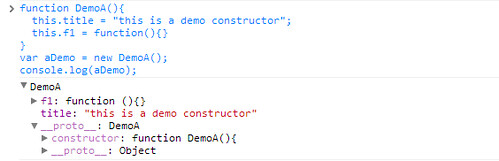
這裡有2個概念比較重要, 第一是Constructor的prototype屬性, 它是Constructor的一個保持共享屬性和方法的對象. 二通過該Constructor生成的對象的__proto__屬性, 它指向了那個prototype對象. 對象的Constructor可以通過該對象的constructor屬性獲得.
我們定義一個簡單的Constructor Demo(), 然後通過他生成一個aDemo對象, 在Chrome的console裡把aDemo打出來看到的結果是這樣的,這是我們能很清楚的看出這種關係.
function DemoA(){ this.title = "this is a demo constructor"; this.f1 = function(){} } var aDemo = new DemoA(); console.log(aDemo); 
jsproto1
換一種寫法,
function DemoB(){ this.title = "this is a demo constructor"; } DemoB.prototype.f2 = function () {}; var bDemo = new DemoB(); console.log(bDemo); 
jsproto2
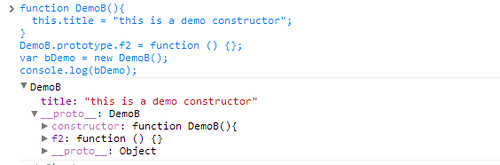
其實跟前面沒多大區別, 不過這一次f2()不在創建出來的對象上, 而是在對象的__proto__指向的構造器DemoB上. 這樣的好處是當使用DemoB創建很多對象時, 比較節省內存.
js的prototype搜索鏈 prototype Chain
js的運行環境是這樣使用構造器的prototype的. 當我們對第一個對象調用其方法時, js運行環境首先看, 這個對象本身有沒有這個方法, 如果有就直接調用. 如果沒找到, 就查找這個對象的__proto__屬性指向的對象(就是前面說的該對象的構造器的prototype屬性), 如果有該方法就調用, 沒有繼續查找__proto__屬性指向對象的__proto__屬性指向的對象, 以此類推. 直到最後, 找到js所有的對象都會指向默認指向的Object(算是js的根對象吧). 所以如果我們給Object上增加個方法, 所以的js對象都能使用.
由於js有對對象函數的prototype chain搜索的特性, 我們可以利用這點來模擬類似其他語言裡類(class)的效果. 如:
function DemoA(){ this.title = "this is a demo constructor"; this.f1 = function(){} } function DemoB(){ this.title = "this is b demo constructor"; this.f2 = function(){} } DemoB.prototype = new DemoA(); var bDemo = new DemoB(); console.log(bDemo); 
jsproto3
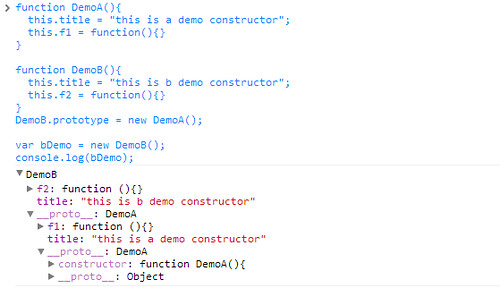
這時我們通過bDemo對象, 不但能調用bDemo上的DemoB的f2()方法, 也能__proto__同對對prototype的搜索, 在bDemo上直接調用DemoA的f1()方法.
function inherit(Child, Parent) { Child.prototype = new Parent(); } 
由於這種寫法在語法上太囉嗦, 不容易理解, 我可以定義一個這樣的函數.
這樣我們前面的例子可以寫成這樣, 效果是一樣的:
function DemoA(){ this.title = "this is a demo constructor"; this.f1 = function(){} } function DemoB(){ this.title = "this is b demo constructor"; this.f2 = function(){} } inherit(DemoB, DemoA); var bDemo = new DemoB(); console.log(bDemo); 

2012年2月20日

JavaScript 依物件某個值排序


JavaScript array sort()


甚麼是array sort?

sort 方法將 Array 對象進行適當的排序;在執行過程中並不會創建新的 Array 對象。
如果為 sortfunction 參數提供了一個函數,那麼該函數必須返回下列值之一:
  • 負值,如果所傳遞的第一個參數比第二個參數小。
  • 零,如果兩個參數相等。
  • 正值,如果第一個參數比第二個參數大。


function sortRscData() { var data = [...]; data.sort(function(a, b){ if(a.itemCtpye.charCodeAt(0) > b.itemCtpye.charCodeAt(0)) return 1; return -1; }); }


Hi,I my name is Augus. I am a author of this blog.I love blogging and I like to share things which I know.
Follow Me On Twitter Or Facebook


2011年12月26日

Java BufferedImage Low Quality 解決方法


在Java中常常使用java.awt.Image庫所提供的方法進行圖像的縮放、及裁切。我們可以使用Graphics2D g = image.createGraphics()的方式得到Graphics物件,並且可以對其繪製圖案上去,但是縮放圖片時,若直接使用draw方法繪製會產生極大的問題,如題Qualtiy降低的問題,在這裡我也提供了解決的方案與原始程式碼的比照。

低畫質的縮圖程式碼
if (imgtype == BufferedImage.TYPE_BYTE_INDEXED || imgtype == BufferedImage.TYPE_BYTE_BINARY) {
     IndexColorModel icm = (IndexColorModel) source.getColorModel();
     image = new BufferedImage(width, height, imgtype, icm);

} else {
     image = new BufferedImage(width, height, imgtype);
}
Graphics g = image.getGraphics();
g.drawImage(source, 0, 0, width, height, null);

Smooth解法程式碼
ColorModel dstCM = source.getColorModel();
image = new BufferedImage(dstCM, dstCM.createCompatibleWritableRaster(width, height),
         dstCM.isAlphaPremultiplied(), null);

Image scaleImage = source.getScaledInstance(width, height, Image.SCALE_SMOOTH);
Graphics2D g = image.createGraphics();
g.drawImage(scaleImage, 0, 0, width, height, null);

縮圖品質比較 :


總表比較 :
總類
畫質
檔案大小
低畫質縮圖
低
7.84kb
Smooth解法
高
7.84kb


由此可以下個結論,直接使用draw繪圖不僅得到低畫質的圖片,也無法得到較低的檔案大小,所以以後使用縮圖就要使用Smooth解法來解。

2011年12月15日

[剪貼]取得TinyMce中的所有img標籤


var srcs = new Array();

// 取得tinyMce內容
var editContent = $('#elm1').html();

// 取得全部的img標籤
var imgs = $(editContent).find('img');


// 去重複
imgs.each(function(index){
srcs[index] = $(this).attr('src');
});

function removeRepeat(a) {
var b = [], n = a.length, i, j;
for (i = 0; i < n; i++) {
for (j = i + 1; j < n; j++)
if (a[i] === a[j]){j=false;break;}
if(j)b.push(a[i]);
}
//console.info((new Date).getTime()-a1)  
return b.sort(function(a,b){return a-b});
}

srcs = removeRepeat(srcs);

2011年12月6日

jQuery事件縮寫


n   blur
n   change
n   click
n   dblclick
n   error
n   focus
n   keydown
n   keypress
n   keyup
n   load
n   mousedown
n   mousemove
n   mouseout
n   mouseover
n   mouseup
n   resize
n   scroll
n   select
n   submit
n   unload

2011年12月5日

TextLayoutFramework 簡單測試


TextLayoutFramework是Flex上一功能齊全的文字編輯器。
它比RichTextEditor的功能還要齊全,可以顯示使用者電腦上的字體,排版等。


// 宣告一個TextArea對象                   
var textarea:TextArea = new TextArea();
textarea.editable = false;
textarea.percentHeight = 100;
textarea.percentWidth = 100;
                      
// 用TextLayout Framework編輯出來的字串
var string:String = "<flow:TextFlow direction='ltr' blockProgression='tb' whiteSpaceCollapse='preserve' xmlns:flow='http://ns.adobe.com/textLayout/2008'><flow:p><flow:span fontSize='48' fontFamily='文泉驛微米黑'><flow:tab/>測試</flow:span></flow:p><flow:p><flow:span fontSize='48' fontFamily='文泉驛微米黑'></flow:span></flow:p><flow:p><flow:span fontSize='48' fontFamily='文泉驛微米黑'></flow:span></flow:p><flow:p textAlign='center'><flow:span fontSize='48' fontFamily='華康巧風體W1'>測</flow:span><flow:span fontSize='48' fontFamily='Mixed'>試</flow:span></flow:p><flow:p><flow:span fontSize='48' fontFamily='華康巧風體W1'></flow:span></flow:p><flow:p><flow:span fontSize='48' fontFamily='文泉驛微米黑'></flow:span></flow:p><flow:p><flow:span fontSize='48' fontFamily='文泉驛微米黑'></flow:span></flow:p></flow:TextFlow>";
                      
// 宣告一個TextFlow對象
var textflow:TextFlow = new TextFlow();
textflow = TextFlowUtil.importFromString(string, WhiteSpaceCollapse.PRESERVE);
                      
// 將TextFlow對象設定給TextArea
textarea.textFlow = textflow;


預覽圖片 :

2011年11月20日

Java 源代碼分析系列 - ArrayList remove(Object object)


  public boolean remove(Object paramObject)
  {
    int i;
    if (paramObject == null)
      for (i = 0; i < this.size; ++i)
      {
        if (this.elementData[i] != null)
          continue;
        fastRemove(i);
        return true;
      }
    else
      for (i = 0; i < this.size; ++i)
      {
        if (!(paramObject.equals(this.elementData[i])))
          continue;
        fastRemove(i);
        return true;
      }
    return false;
  }

從代碼可以看到,remove這個方法可以刪除目標之object物件,並且可以使用它來刪除我們陣列null值,null刪除與非null刪除使用不同的判斷式來完成。
當迴圈中找到刪除目標時,會呼叫fastRemove(int)這個方法將該位置的元素刪除,fastRemove這個方法與ArrayList.remove(int)方法極為相似(參考Java 源代碼分析系列 - ArrayList remove(int pst)),但fastRemove如其名,式快速的刪除,因此裡面並沒有多餘的判斷(超出大小等),即沒有回傳值。代碼如下:

  private void fastRemove(int paramInt)
  {
    this.modCount += 1;
    int i = this.size - paramInt - 1;
    if (i > 0)
      System.arraycopy(this.elementData, paramInt + 1, this.elementData, paramInt, i);
    this.elementData[(--this.size)] = null;
  }


欲刪除paramInt位置


使用System.arraycopy(this.elementData, paramInt + 1, this.elementData, paramInt, i);將剩餘的陣列連接起來


 +


該方法會將欲刪除部分之後(黃色)陣列連接到原來陣列欲刪除的位置(紅色)上。


this.elementData[(--this.size)] = null;
刪除最後一個元素


ShareThis